How to Set Up Claude Projects
The 90% of Claude's power most people never touch.

In Meta-Prompting 101, I showed how to build prompts that don't make AI guess. Expert instructions, context gathering, structured execution. A meta-prompt that creates prompts.
But even great prompts have a problem: they forget.
Every time you open a new chat, the AI starts from zero. It doesn't know who you are. It doesn't know what you're working on. It doesn't know your voice, your constraints, your principles. You're back to explaining everything from scratch.
Claude Projects fix this. And most people never set them up.
What a Project Actually Is
A Claude Project is a persistent workspace. You give it files, instructions, and context that carry across every conversation you start inside it. The AI reads them before it responds to anything.
Think of it as the difference between hiring a freelancer for a one-off task (a chat) and onboarding a team member who knows your business (a project). Same AI. Completely different results.
But here's the thing — most people who do set up a project just dump a few files in and hope for the best. That's the slot machine again, just with more context in the hopper.
There's a better way. And I didn't invent it.
Soul & Context: The Structure That Makes It Work
This comes from OpenClaw — an open-source AI agent framework that got a lot of attention in early 2026. Their innovation wasn't the agent itself. It was how they structured what the agent knows.
They split it into two layers:
Soul — Who you are. How you think. Your principles. Your communication style. Your anti-patterns. The things that don't change week to week.
Context — What's happening now. Your current projects. Your clients. Your financials. Your open questions. The things that change constantly.
This separation is the key. Soul is stable. Context is fluid. And by keeping them apart, you can update one without touching the other.
I took this and applied it to Claude Projects. Here's what my actual setup looks like:
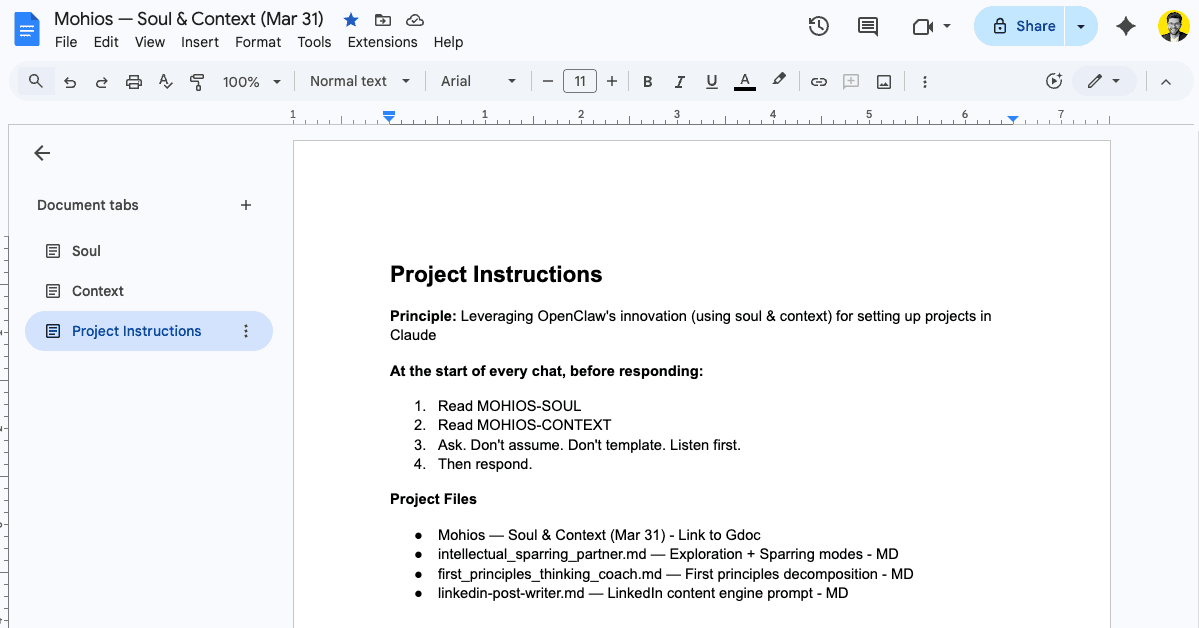
Three tabs in a single Google Doc:
Who I am, how I work, what modes I operate in (exploration, sparring, first principles, builder), my principles ("challenge my thinking — not a yes-machine"), my anti-patterns ("over-planning as procrastination," "scope creep before showing anyone"), even my energy patterns (up at 4am, fading by 11am). This is the stuff that makes Claude feel like it actually knows me.
My current engagements, what's active, what's parked, financials, key relationships, open questions. This changes every week or two. When I land a new client or finish a project, I update this tab. Claude immediately knows.
The glue. Four lines:
- Read Soul.
- Read Context.
- Ask. Don't assume. Don't template. Listen first.
- Then respond.
That's it. Those four lines turn Claude from a generic assistant into something that works like a team member who's been briefed.
The Google Doc Trick
Most people upload markdown files to their Claude Projects. That works, but it has a problem: every time something changes, you have to re-upload. Files go stale. You forget to update them. The AI is working from last month's reality.
I link a live Google Doc instead.
Claude has read-only access to Google Drive. So I maintain one Google Doc — with Soul, Context, and Project Instructions as separate tabs — and Claude reads the current version every time I start a conversation.
One source of truth. Always current. No re-uploading.
When I update my Context tab on Monday morning — new client signed, project shipped, open question resolved — every conversation I start that week already knows.
Solo vs. Team
When you're working alone, the single Google Doc approach is all you need. Soul, Context, and Instructions in one place. Link it. Done.
When you're working with a team, the separation matters more.
Your team needs to know what's happening — active projects, client details, current priorities. This is the shared workspace. Everyone's Claude Projects can reference the same Context doc.
How you think, your communication preferences, your anti-patterns, your energy patterns — that's yours. Your teammate has their own Soul doc with their own working style. The AI adapts to each person individually while sharing the same project reality.
This is subtle but important. Two people on the same project get the same facts but different interactions. The AI matches their working style, not a one-size-fits-all project persona.
What Goes Where
If you're setting up your first project, here's a simple guide:
- •Your role and background
- •How you work best
- •Communication preferences
- •Working modes and how to detect them
- •Principles
- •Anti-patterns to flag
- •Energy and wellbeing patterns
- •Active engagements and their status
- •Key people and relationships
- •Financial snapshot
- •What's on the horizon
- •Open questions
- •Recent decisions
- •Tools and resources you're using
- •How to use Soul and Context
- •What to do at the start of every chat
- •What to prioritise
- •Any project-specific rules
The more specific you are, the less the AI guesses. A Soul doc that says "be direct" is fine. A Soul doc that says "when I say 'think with me' I want exploration mode, when I say 'challenge this' I want sparring mode" is transformative.
The Connection to Meta-Prompting
Soul and Context are the persistent layer. The meta-prompts from Article 1 are the action layer.
Soul tells the AI who you are. Context tells it what's happening. Meta-prompts tell it what to do — with expert instructions, context gathering, and structured execution built in.
But those meta-prompts, once you've built and refined them, become something more permanent. They become skills — reusable .md files you attach to your project and reach for whenever you need them.

Danny builds AI systems for NZ businesses that sound like the people who run them. Based in Auckland, working at the intersection of conversation and code.
Ready to set up your first Claude Project?
Soul and Context aren't just frameworks — they're the foundation of AI that actually knows how you work. Not how everyone works. How you work.
Start building →